Start with
One trigger, realistic sample data, and a measurable outcome.
Agentic AI automation
Learn how to build agentic AI automation with Zapier in 2026 connect AI agents to your apps, automate multi-step tasks, and scale reliably. By Numan, full-stack & agentic AI engineer.
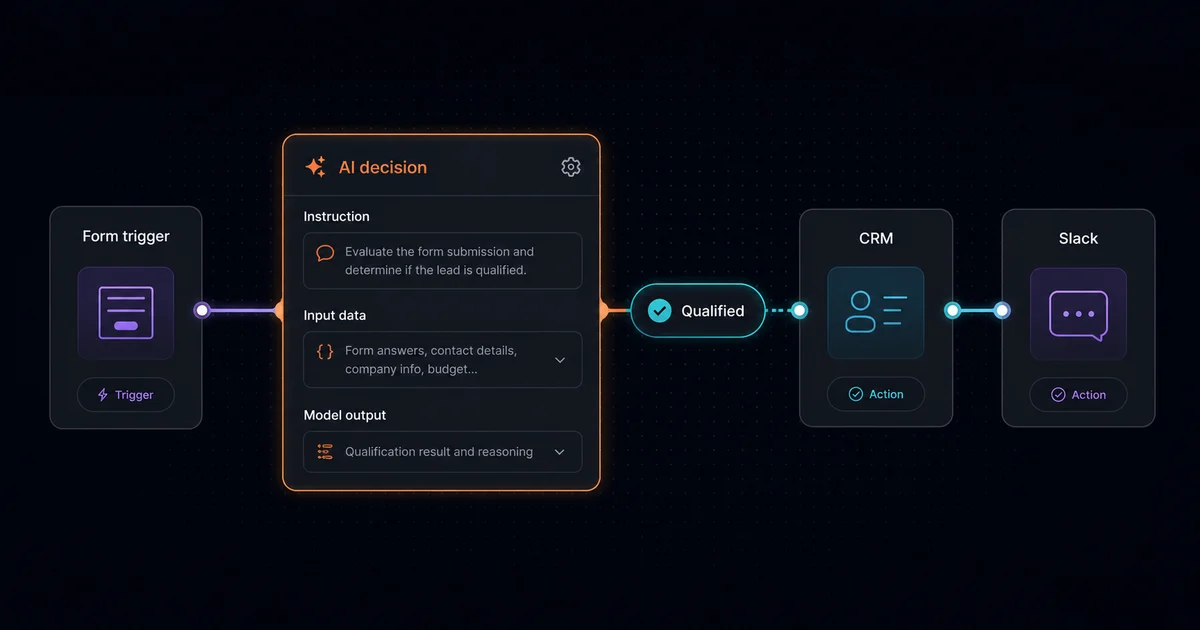
One trigger, realistic sample data, and a measurable outcome.
Use AI for classification, extraction, drafting, or bounded routing.
Validate output, monitor runs, and approve consequential actions.
Zapier agentic AI automation combines the platform's trigger-and-action workflows with a bounded AI decision. A model can interpret context, classify a record, draft a response, or choose an approved route; Zapier then handles connected app actions, conditional Paths, credentials, and run history. The workflow remains constrained even when one step uses judgment.
Zapier's current product surface is broader than a basic two-app connector. Its official documentation describes AI by Zapier steps, Agents, Copilot, MCP, and SDK access alongside Zaps, Tables, and Forms. That makes it practical for an agent to act through defined tools instead of receiving unrestricted credentials to every service.
Those numbers describe coverage and billing, not guaranteed reliability. Reliability still depends on input quality, integration permissions, branch design, model output validation, retry behavior, and an owner who watches failed runs.
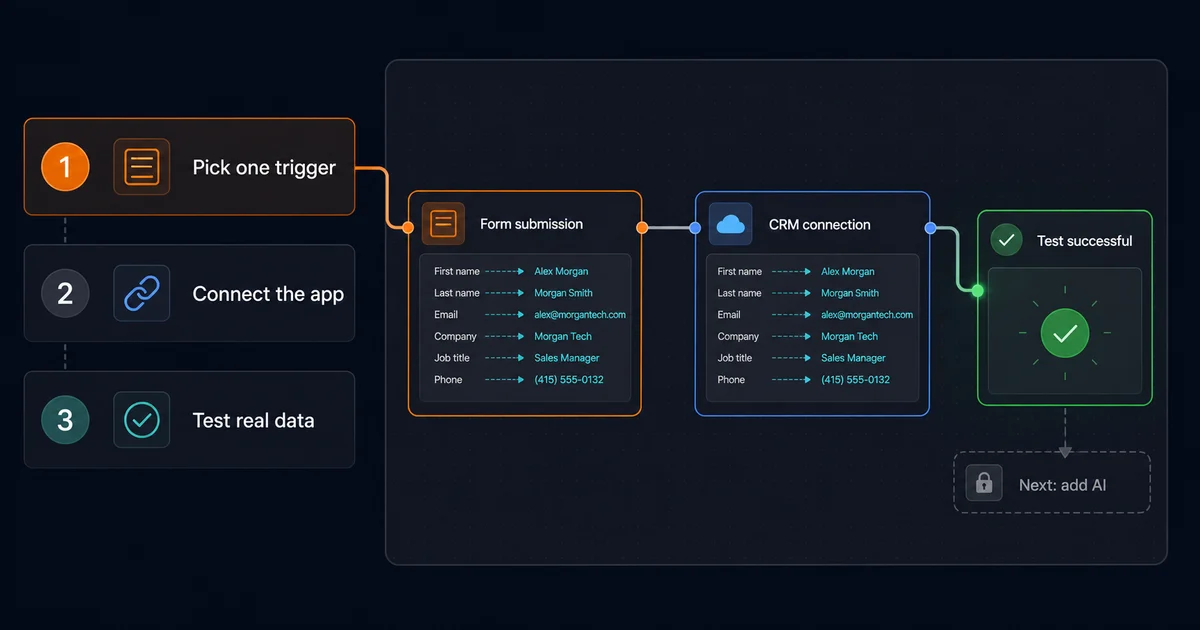
Begin with the deterministic parts. Choose a trigger such as a form submission, support email, webhook, calendar event, or CRM change. Connect only the accounts the workflow needs, pull a realistic test record, and map clean fields into the AI step. In Zapier, that step may be AI by Zapier, a Zapier Agent, MCP, or an API-backed action.
category, confidence, reason, and next_action.For a customer-facing product, Full-stack AI app development can keep authentication, user experience, and product data in the application while Zapier handles well-defined operational handoffs.
A multi-step Zap can enrich a record, call an AI step, branch through Paths, update one or more apps, delay a follow-up, and ask a person to approve a sensitive action. Zapier Paths supports conditional branches; it is useful for clear business routes, although n8n's node graph and Make.com's routers can be more flexible for deeply nested transformations.
Consider support triage. A new email triggers the Zap, a lookup fetches customer tier and recent tickets, and an AI step returns urgency and confidence. An urgent high-confidence case creates a help-desk ticket and alerts Slack. A routine case produces a draft reply for approval. A low-confidence result goes directly to human review.
Production reliability comes from boundaries: validate required fields before the model call, constrain outputs, test every Path, avoid hidden autonomous loops, set an exception route, and review task consumption. A Next.js development for workflow automation layer is useful when approvals, role-based access, audit views, or customer dashboards should live outside Zapier.
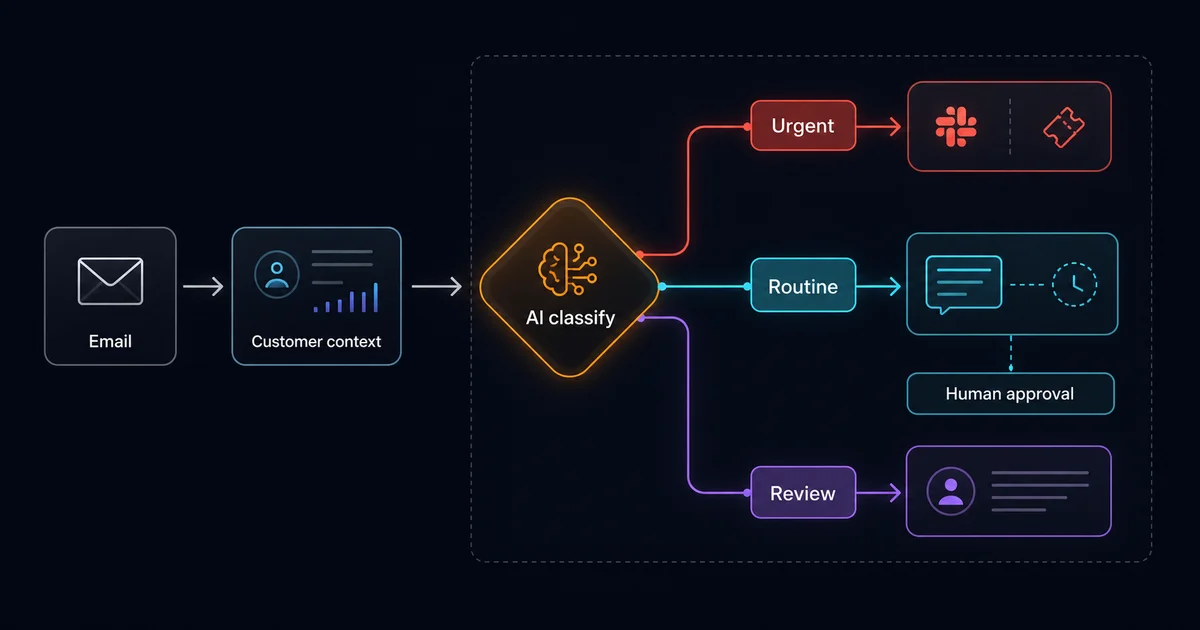
The best use cases insert narrow judgment into a process that already has a clear owner and destination:
Lead qualification is a good first build because the trigger, context, score, CRM write, and review path are easy to see and test. Mobile teams can expose the same approval queue through React Native consulting services when operators need to review decisions away from a desktop.
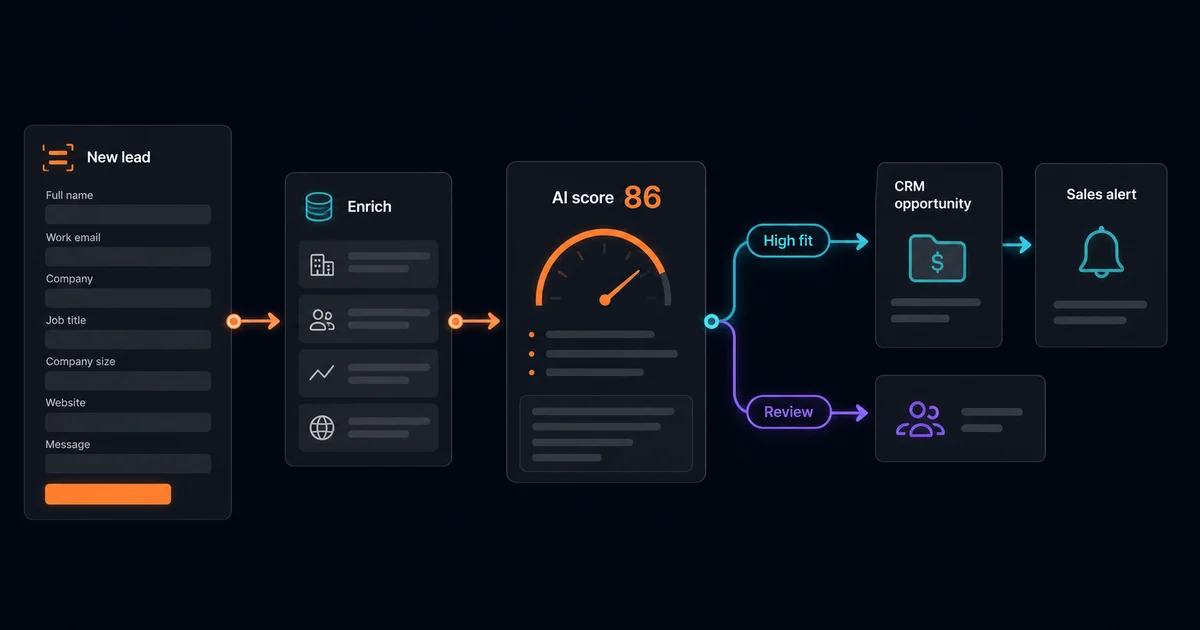
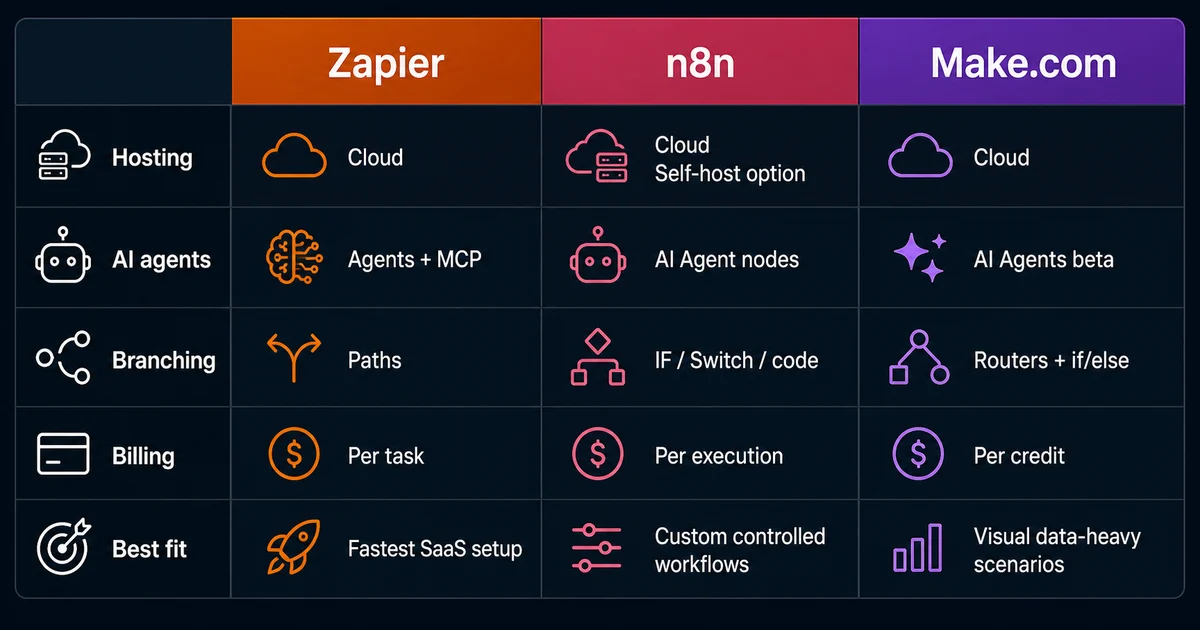
No single tool wins every workflow. Zapier emphasizes rapid setup and broad SaaS coverage. n8n offers cloud and self-hosted deployment, native AI Agent nodes, code, and detailed node-level control. Make.com is cloud-hosted and combines visual routers, nested if/else logic, data mapping, and Make AI Agents, which its pricing page currently labels beta.
| Capability | Zapier | n8n | Make.com |
|---|---|---|---|
| Self-hosting | No; hosted service | Yes; Community and paid self-hosted options | No; hosted service with an on-prem agent for local-network access |
| Native LLM / agent features | Yes; AI steps, Agents, MCP, and SDK | Yes; AI Agent and model/tool nodes | Yes; AI Agents (beta), AI Toolkit, and MCP |
| Complex branching logic | Conditional Paths; approachable for defined routes | Advanced IF, Switch, Merge, Code, and sub-workflows | Advanced routers, filters, nested if/else, and merge |
| Pricing model | Primarily per successful action task; some built-in steps do not count | Cloud plans by workflow execution; self-hosted terms vary by edition | Per credit; most module actions use one credit, with exceptions |
| Best for | Fast, governed app-to-app automation across a broad SaaS catalog | Custom agentic workflows needing code, hosting control, or deep inspection | Visual, data-heavy scenarios with sophisticated branching |
The comparison is based on current official documentation for Zapier Paths, n8n AI Agents, n8n pricing, Make routers, and Make pricing and AI features. For a deeper implementation comparison, read n8n automation for agentic AI workflows.
The first practical milestone is not an autonomous agent. It is a tested trigger that retrieves realistic data and reaches the correct destination. Once that deterministic foundation works, add AI only where it removes a genuine judgment bottleneck.
I am a full-stack developer and agent-loop engineer based in Lahore, Pakistan, working remotely with global teams. I build with React Native, Next.js, Node.js, TypeScript, native Android and iOS, and agentic AI systems, so I judge an automation by the product boundary around it: identity, permissions, structured data, observability, recovery, and human control.
My open-source work includes react-native-compressor, which receives 200k+ weekly downloads, and react-native-keys. I have 25k+ reputation on Stack Overflow and have contributed to React Native Core, Expo Core, and React Native Reanimated. That experience makes me cautious about invisible failure modes: a workflow should be testable, inspectable, and owned like application code.
I currently work as Sr. Full Stack Mobile Engineer at Ninja, a Saudi Arabian grocery and food-delivery unicorn valued at $1B, building with React Native, Next.js, and automation-adjacent systems. In that context, Zapier fits best at clear SaaS boundaries; core product state and high-risk decisions should stay behind application APIs, permissions, logs, and deliberate review.
Agentic AI automation in Zapier combines a trigger-and-action workflow with bounded AI judgment. The AI can classify, summarize, draft, or select an approved route, while Zapier controls app connections, Paths, actions, task usage, and run history. Human approval should remain in front of customer-facing or irreversible changes.
Start with a trigger, connect the source and destination apps, and pass clean fields into an AI by Zapier step, Zapier Agent, MCP tool, or API action. Ask for structured output, map that output into filters or Paths, test with realistic records, and restrict sensitive actions with permissions and approval steps.
A standard Zap follows predefined rules: a trigger fires and known actions run. An agentic workflow adds a model-driven decision inside those boundaries, such as choosing a route or drafting a response from context. Zapier still supplies the deterministic trigger, connected actions, branch rules, logs, and human review that make the result operationally safe.
Yes, for bounded workflows across supported apps, provided the flow includes validated inputs, structured AI output, explicit Paths, realistic tests, monitoring, and an exception route. Reliability drops when one Zap becomes an unrestricted loop or hides too much custom logic. Keep consequential writes and outbound messages behind approval until the workflow is proven.
Practical uses include qualifying inbound leads before updating a CRM, triaging support messages and drafting replies, summarizing daily metrics, enriching sales records, preparing content checklists, and routing ecommerce exceptions. These cases combine narrow AI judgment with deterministic app actions, a clear workflow owner, and a visible review path for uncertain results.
Zapier is usually the quickest choice for governed automation across a broad SaaS catalog. n8n offers self-hosting, code nodes, and deeper control for custom agent tools. Make.com provides strong visual routers, nested branching, and beta AI Agents. Compare app coverage, hosting, billing unit, logic depth, governance, and the team that will operate it.
Written by Numan — full-stack developer and agentic AI engineer based in Lahore, Pakistan. Currently Sr. Full Stack Mobile Engineer at Ninja, and author of react-native-compressor (200k+ weekly downloads). Connect on LinkedIn or GitHub.