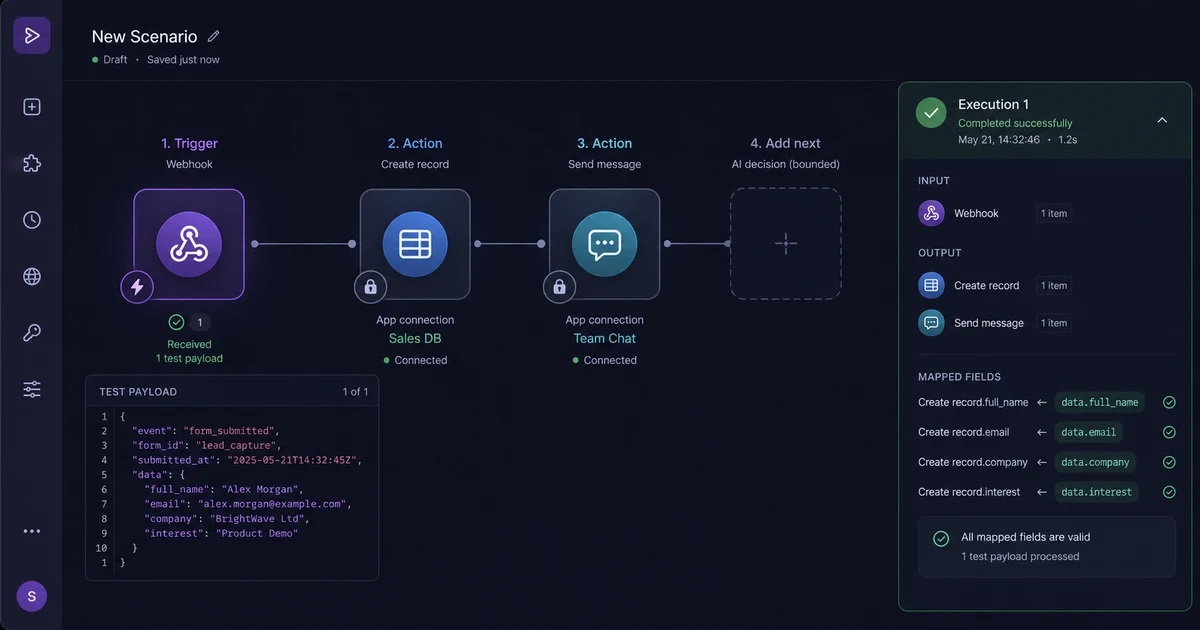
Start deterministic
Test one trigger, realistic data, and the destination before adding AI.
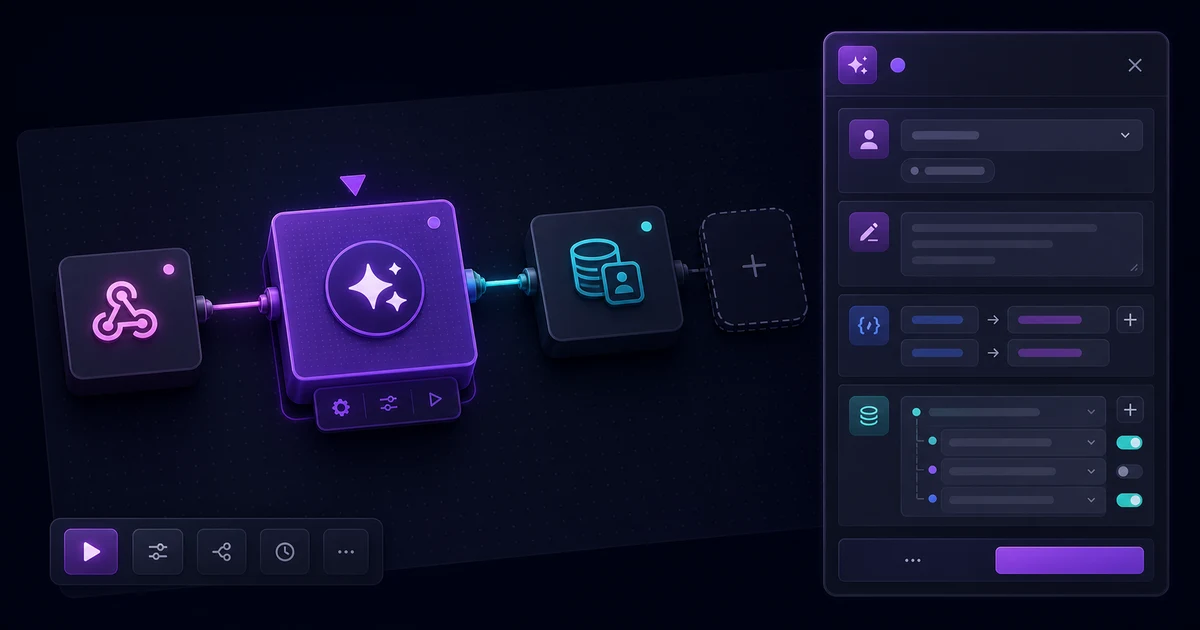
Agentic AI automation
Learn how to build agentic AI automation with Make.com connect AI agents to your apps, automate multi-step tasks, and scale reliably. By Numan, full-stack & agentic AI engineer.
Test one trigger, realistic data, and the destination before adding AI.
Use an agent for interpretation, tool choice, or routing within explicit limits.
Inspect outputs, branches, errors, approvals, and credit use on every path.
Make.com combines a visual scenario builder with app modules, webhooks, routers, filters, data mapping, HTTP calls, and AI tools. Agentic AI adds bounded judgment: an agent can interpret an invoice, classify a support request, select an approved tool, or recommend the next route, while deterministic scenario modules control credentials and real-world actions.
Make's current AI Agents product is built directly into its visual canvas and can reuse agents across workflows. That is different from handing a model broad access to business systems: the scenario defines which data reaches the agent, which tools it can call, which branch receives the response, and when a person must approve the outcome.
These figures describe reach and billing, not guaranteed workflow quality. Reliable automation still depends on clean inputs, least-privilege connections, structured model output, tested branches, retries, and clear ownership.
Begin with a stable trigger such as a webhook, scheduled run, form submission, support ticket, or CRM change. Pull a realistic sample bundle, inspect each field, and connect only the accounts needed for the outcome. Then add a Make AI Agent module, AI Toolkit step, supported model module, or secured HTTP call to a Node.js agent API.
category, confidence, reason, and next_action.For customer-facing products, Full-stack AI app development keeps identity, permissions, and product state in the application while Make handles defined operational handoffs.
A multi-step scenario can receive data, enrich it through an API, ask an agent for a structured decision, split the bundle through a router, update connected apps, and record an audit trail. Make routers create multiple ordered routes, filters apply conditions, and a fallback route catches data that matches no other condition.
For support triage, an incoming message can be combined with customer tier and ticket history. The agent returns urgency and confidence. The router sends urgent cases to an alert, routine cases to a drafted response, and uncertain cases to human review. Make documents that routers themselves do not consume credits, although modules executed on their routes can.
Reliability comes from boundaries: validate required fields, constrain output, keep writes idempotent, add error handlers, test the fallback route, and avoid invisible autonomous loops. Next.js development for workflow automation is useful when approvals, access control, audit views, or customer dashboards should live outside Make.
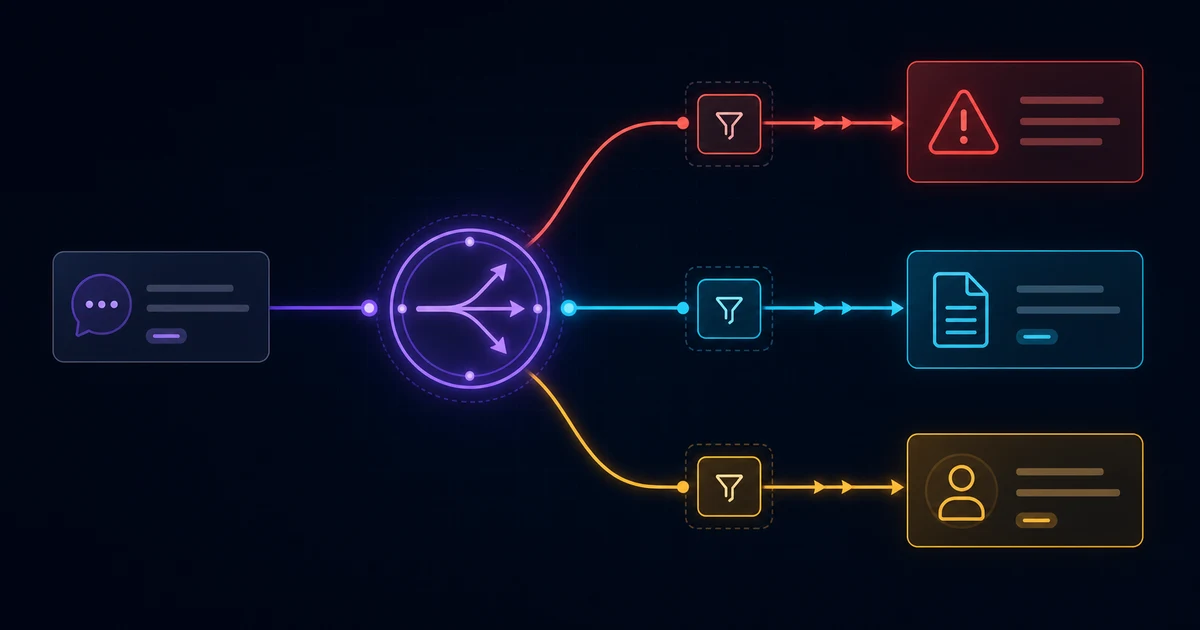
The strongest use cases add narrow judgment to a process with a clear owner and destination:
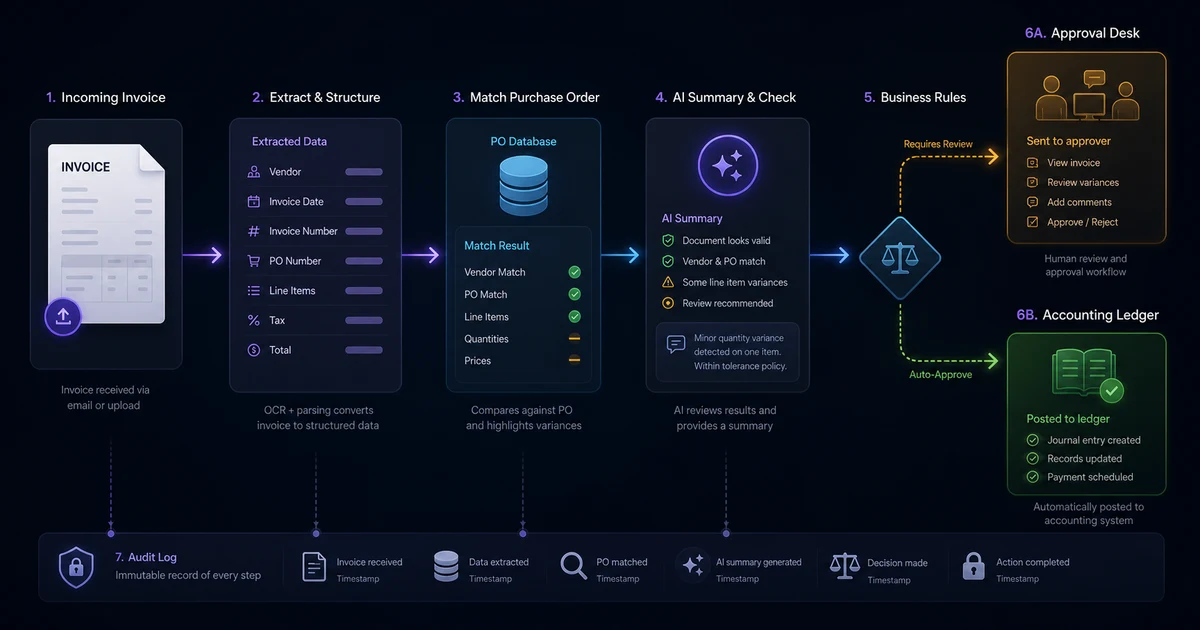
Invoice processing is a concrete first use case because every extracted field, match, exception, approval, and ledger write can be inspected. React Native consulting services can expose the same review queue to operators who approve time-sensitive exceptions from mobile.
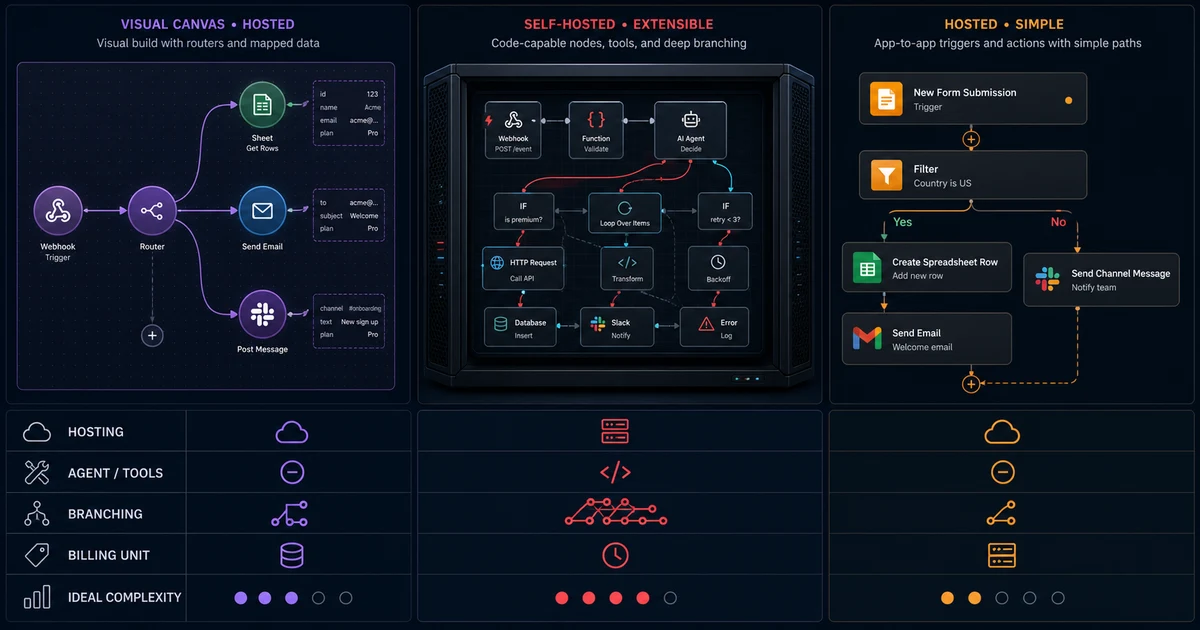
No platform wins every workflow. Make is a hosted visual platform with native AI Agents, sophisticated routers, filters, and data mapping. n8n offers cloud and self-hosted deployment plus AI Agent, model, tool, Code, and sub-workflow nodes. Zapier is hosted and combines AI steps, Agents, MCP, and conditional Paths with a broad SaaS catalog.
| Capability | Make.com | n8n | Zapier |
|---|---|---|---|
| Self-hosting | No; hosted service, with an on-prem agent for local-network access | Yes; Community and paid self-hosted options | No; hosted service |
| Native LLM / agent features | Yes; AI Agents, AI Toolkit, model apps, and MCP | Yes; AI Agent plus model and tool nodes | Yes; AI steps, Agents, MCP, and SDK |
| Complex branching logic | Advanced routers, filters, fallback routes, and nested logic | Advanced IF, Switch, Merge, Code, and sub-workflows | Conditional Paths suited to defined business routes |
| Pricing model | Per credit; most non-AI module actions use one credit, with AI exceptions | Cloud plans by workflow execution; self-hosted terms vary by edition | Primarily per successful action task; some built-in steps do not count |
| Best for | Visual, data-heavy automation with sophisticated mapping and branching | Custom agentic workflows needing code, hosting control, or deep inspection | Fast, governed app-to-app automation across a broad SaaS catalog |
This comparison follows current official documentation for Make routers, Make pricing and AI features, n8n hosting, n8n's AI Agent node, and Zapier Paths. Read n8n automation for agentic AI workflows and Zapier agentic AI automation for deeper implementation guidance.
The first practical milestone is a tested trigger that maps valid data into the correct destination. Once that deterministic path succeeds and can be retried safely, insert the AI step where human judgment is genuinely slowing the process.
I am a full-stack developer and agent-loop engineer based in Lahore, Pakistan, working remotely for global teams. I build with React Native, Next.js, Node.js, TypeScript, native Android and iOS, and agentic AI systems, so I evaluate Make as one bounded orchestration layer inside a larger product architecture.
My open-source work includes react-native-compressor, with 200k+ weekly downloads, and react-native-keys. I have 25k+ reputation on Stack Overflow and have contributed to React Native Core, Expo Core, and React Native Reanimated. That experience makes visible state, reproducible tests, clear failure paths, and maintainable ownership non-negotiable.
I currently work as Sr. Full Stack Mobile Engineer at Ninja, a Saudi Arabian grocery and food-delivery unicorn valued at $1B, building with React Native, Next.js, and automation-adjacent systems. Make fits best when visual orchestration helps operators and engineers collaborate; core product state and high-risk permissions should remain behind application APIs and audit controls.
Agentic AI automation in Make.com combines adaptive model decisions with visible scenario logic. An agent can interpret unstructured input, select approved tools, or recommend a route, while Make modules handle credentials, data mapping, app actions, errors, and approvals. The scenario keeps the agent bounded instead of giving it unrestricted system access.
Start with a webhook, schedule, or app trigger and test a realistic payload. Add a Make AI Agent module or a supported model/API module, map only the required fields, and request structured output. Then use filters and a router to send each allowed result to explicit app actions or human review.
A standard scenario follows predefined rules: when an event occurs, fixed modules run in a known order. An agentic workflow adds bounded judgment for work such as interpreting documents, choosing an approved tool, or selecting a route. Deterministic modules should still own permissions, validation, writes, retries, and consequential approvals.
Yes, for bounded tasks with observable steps and controlled tools. Reliability depends on validated inputs, structured outputs, router filters, fallback routes, idempotent writes, error handlers, and human approval for risky actions. Avoid open-ended loops; test every branch and monitor scenario history, credit usage, model failures, and external API errors.
Useful cases include support triage, lead qualification, invoice extraction and approval, content intake, sales-call follow-up, ecommerce exception routing, and daily reporting. Make works best when AI performs a narrow interpretation or recommendation and the scenario maps data, updates approved systems, records the result, and escalates uncertainty to a person.
Make.com suits cloud-hosted, visual, data-heavy scenarios with routers and strong mapping. n8n adds self-hosting, code nodes, sub-workflows, and deeper developer control. Zapier favors fast, governed SaaS automation across a broad app catalog. Compare hosting, integration coverage, branching depth, billing units, debugging needs, and who will maintain the workflow.