Mobile boundary
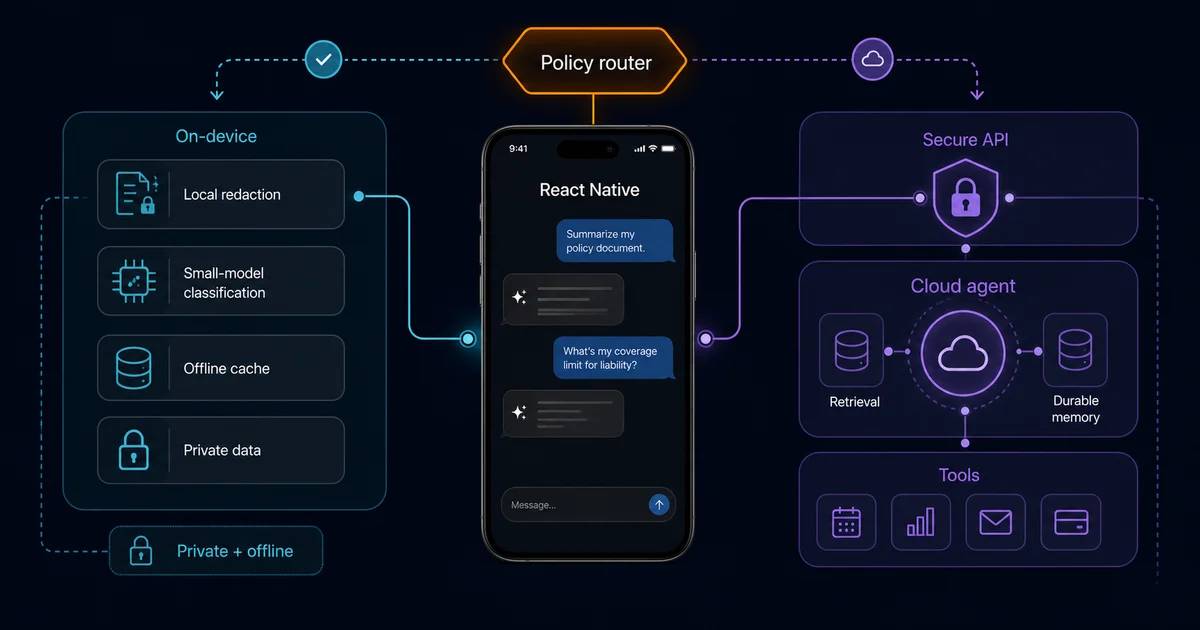
The app owns interaction, consent, local state, progress, and recovery.
React Native and agentic AI
Build AI agent-powered mobile apps with React Native: architecture patterns, streaming and tool-call implementation tips, and common pitfalls.
The app owns interaction, consent, local state, progress, and recovery.
The backend owns model credentials, tool policy, orchestration, and audit logs.
Useful autonomy without freezing the UI or hiding consequential actions.
An AI agent-powered mobile app does more than send prompts to a chat endpoint: it maintains task state, reasons over context, selects approved tools, streams progress, and returns results the mobile product can safely present or act on.
A chat integration normally sends messages to a model and renders text. An agent-powered app adds a controlled loop: understand the user's goal, inspect permitted context, choose a tool, wait for its result, update the plan, and either continue or ask the user for approval. The output may be text, but the product value comes from completing a task safely.
For example, a delivery app assistant might explain an order, look up live status through a backend tool, propose a new delivery window, ask for confirmation, and only then submit the change. The React Native client should never treat model text as authority. It renders typed events and approval prompts; trusted services validate identity, permissions, tool arguments, and writes.
These figures show device availability and reported use, not that every phone should run a large agent locally. React Native teams still need capability checks, cloud fallbacks, and a product reason for adding agent behavior.
On-device and cloud inference solve different problems. A local model can classify, redact, transcribe, embed, or summarize small inputs with low latency and stronger data locality. A cloud agent can use larger models, retrieval systems, durable memory, queues, and authenticated business tools. Most serious products use a hybrid rather than choosing one for everything.
| Approach | On-Device Agent | Cloud-Based Agent |
|---|---|---|
| Latency | Lower after model initialization | Higher and network-dependent |
| Offline support | Yes, for downloaded models and local tools | No, unless the app queues work for later |
| Model capability | Limited by device memory, compute, and model size | Full-scale LLMs, retrieval, durable jobs, and broader tools |
| Battery/resource use | Higher device CPU, GPU, NPU, memory, and thermal load | Lower inference load on-device, with radio and streaming costs |
| Best for | Privacy-sensitive, latency-critical, narrow tasks | Complex reasoning, tool use, shared knowledge, and long-running work |
A practical hybrid pipeline can redact personal fields locally, send only the required context to a Node.js or Next.js agent API, execute privileged tools on the server, and stream typed status events back. Never ship provider secrets in the bundle. Use short-lived user tokens to call your backend, then enforce authorization again for every tool.
Device fragmentation matters. Test memory pressure, cold model load, thermal throttling, battery use, and background behavior on representative Android and iOS hardware. If local inference is optional, detect capability at runtime and keep a server path or a deterministic non-AI fallback.
Streaming should be modeled as a sequence of events, not one endlessly growing string. A useful protocol might emit run.started, message.delta, tool.started, tool.completed, approval.required, run.completed, and run.failed. Give every run and tool call an ID so stale chunks cannot update a newer conversation.
Server-Sent Events are convenient for one-way server streaming, while WebSockets fit bidirectional sessions and realtime collaboration. React Native networking behavior varies by runtime and library, so isolate transport behind a small adapter. The conversation store should consume normalized domain events rather than knowing whether they arrived through fetch streaming, SSE, WebSocket, or a polling fallback.
AbortController or transport-specific cancel command and mark cancellation as a real terminal state.AppState moves between active and background.The UI should show what the agent is doing: connecting, reading context, waiting for approval, calling a tool, retrying, or finishing. A generic spinner makes a 12-second run feel broken; specific progress makes the same delay understandable.
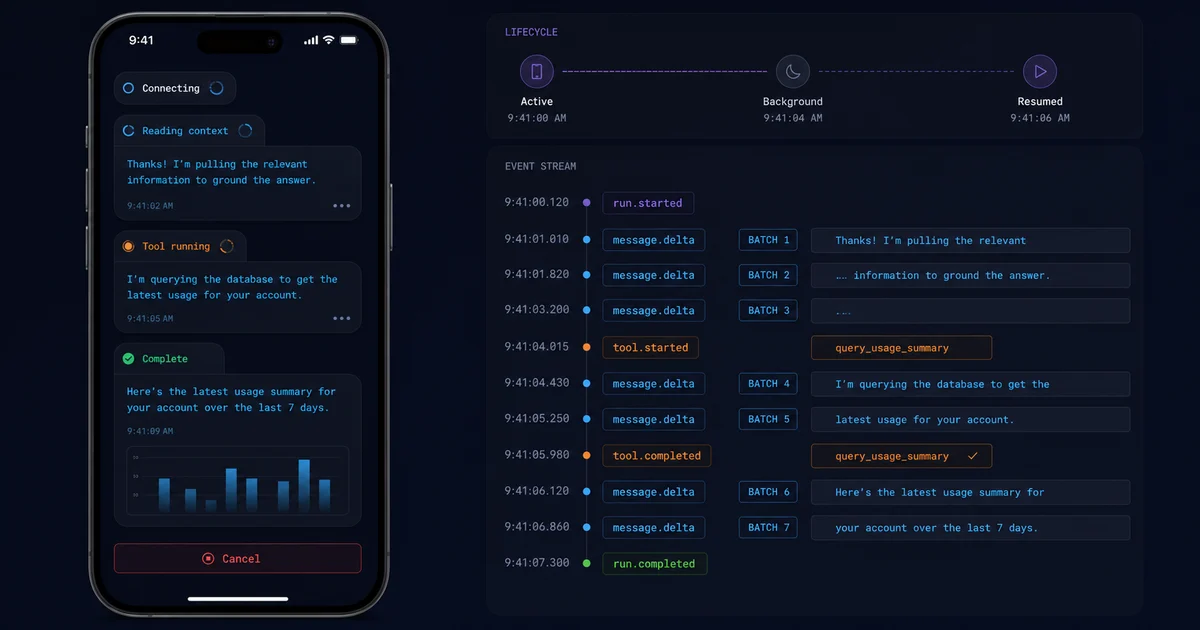
Separate durable conversation data from ephemeral execution state. Durable data includes message IDs, roles, final content, attachments, timestamps, and the server conversation ID. Ephemeral data includes the active run ID, accumulated deltas, current tool status, retry count, network state, and pending approval.
A reducer or focused external store works well because agent events are ordered state transitions. The same event should be safe to process twice, and an older run should never overwrite a newer one. Keep server truth authoritative for tool completion, while optimistic UI is appropriate for the user's outgoing message and explicit local actions.
Also define recovery states, not only success and failure. A run might be queued, partially complete, waiting for confirmation, timed out, cancelled, or completed after the app went to the background. On resume, fetch the run by ID and reconcile rather than restarting a possibly non-idempotent action.
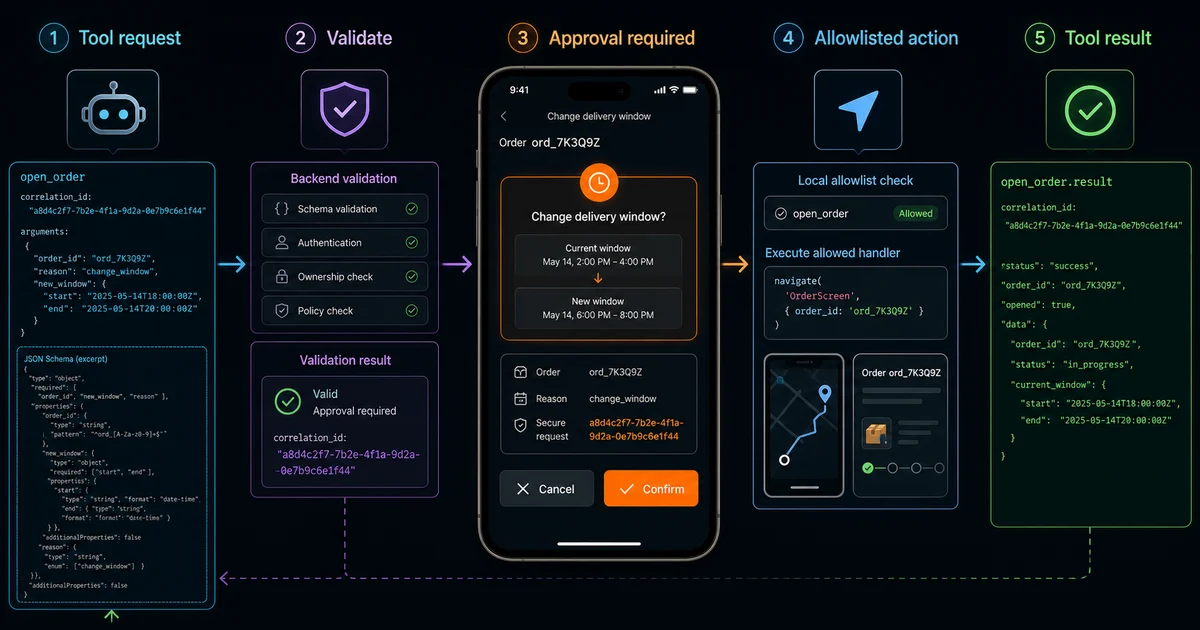
A tool call should be a typed request, not executable prose. The agent returns a tool name and JSON arguments that conform to a schema. The orchestrator validates them, checks the user's permission, records an idempotency key, and decides whether the tool runs on the server or becomes an allowlisted client command.
Server tools should own CRM writes, payments, account changes, private retrieval, and third-party credentials. Client tools should be narrow and reversible: navigate to an order, populate a draft form, open a map preview, focus a field, or request a device permission through normal app UI. Require an explicit user tap before sending a message, placing an order, deleting data, or changing account state.
A safe round trip is: model proposes open_order; backend validates the order belongs to the user; app receives an approval.required or client-tool event; the local registry maps the name to a typed handler; the handler navigates; and its structured result returns to the run. Unknown tools fail closed.
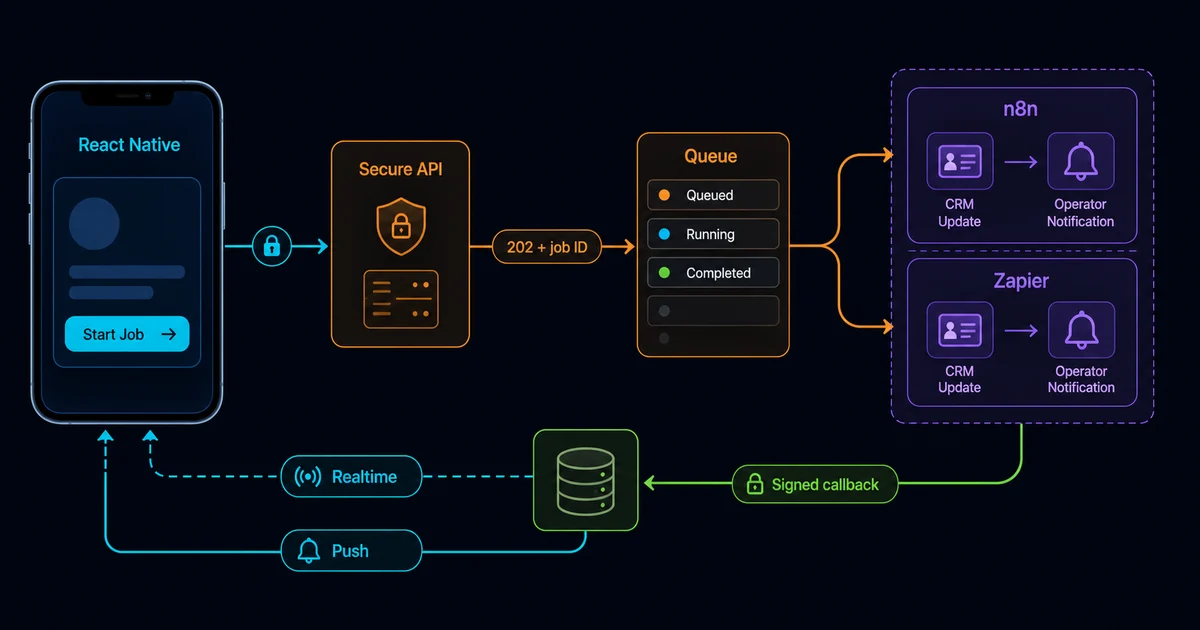
Automation platforms are useful beyond the synchronous chat path. A mobile action can call your backend, which publishes a signed event or queue job to n8n, Zapier, or Make.com. The workflow can enrich data, notify an operator, update a supported SaaS system, or start a long-running agent task. Results return through a webhook callback, database record, realtime channel, or push notification.
Use n8n automation for agentic AI workflows when custom APIs, reusable sub-workflows, visible node execution, or self-hosting matter. Zapier agentic AI automation fits broad SaaS connectivity and quicker operational handoffs. Make.com is useful for visual data mapping and branching. The mobile client should not hold any platform credential.
202 Accepted for long work and give the app a job ID immediately.This separation is central to Full-stack AI app development: React Native owns the product experience, a typed backend owns identity and domain rules, and the automation layer owns replaceable operational orchestration.
The most damaging mistakes usually happen around the model rather than inside it:
Performance testing should include slower Android devices, poor networks, background/resume cycles, very long conversations, tool timeouts, malformed events, and rapid cancellation. Teams that need help reviewing those boundaries can use my React Native consulting services or hire a React Native developer for implementation.
I am a full-stack developer and agent-loop engineer based in Lahore, Pakistan, working remotely for global teams. I build with React Native, Next.js, Node.js, TypeScript, native Android and iOS, and agentic AI systems. That cross-layer experience matters because mobile agent failures often cross the UI, transport, backend, orchestration, and native lifecycle boundaries.
I have 25k+ reputation on Stack Overflow, maintain react-native-compressor with 200k+ weekly downloads and react-native-keys, and have contributed to React Native Core, Expo Core, and React Native Reanimated. Open-source maintenance reinforces the same production habits agent apps need: explicit contracts, compatibility, failure handling, useful logs, and careful resource use.
I currently work as Sr. Full Stack Mobile Engineer at Ninja, a Saudi Arabian grocery and food-delivery unicorn valued at $1B. The practical lesson from production mobile systems is simple: an impressive model demo is not yet a reliable app. The surrounding state machine, permissions, responsiveness, recovery, and operational ownership make it a product.
An AI agent-powered mobile app lets a model work toward a goal through approved tools, state, and multi-step decisions. Unlike a chatbot that only returns text, the agent may inspect app context, request confirmation, call a backend tool, update a task, and report progress while the mobile interface keeps the user in control.
Use on-device inference for narrow, privacy-sensitive, latency-critical, or offline tasks that fit supported hardware. Use a cloud agent for stronger models, retrieval, long-running work, and privileged tools. Many production apps use a hybrid: local classification or redaction, with complex reasoning and business actions handled by a secured backend.
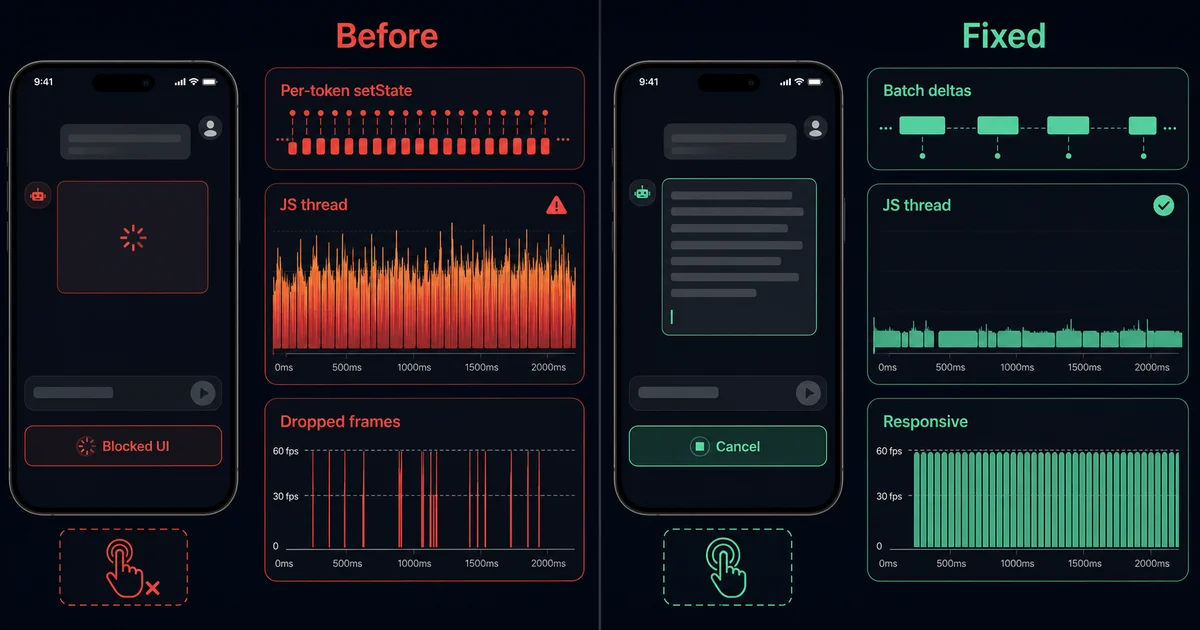
Stream typed events rather than treating every chunk as final text. Keep separate state for connection status, visible text, tool activity, completion, and errors. Batch frequent text updates, support cancellation, ignore stale request IDs, and reconnect or fall back to a non-streaming result when the app backgrounds or the network changes.
The agent should return a structured tool request with a name, validated arguments, and correlation ID. A trusted backend authorizes privileged work. The React Native client handles only allowlisted local actions—such as navigation or opening a draft—and asks for confirmation before sensitive changes. Tool results then return to the same agent run.
Yes. A mobile backend can send a signed webhook or queue event to n8n, Zapier, or Make.com, then receive status through a callback, database update, push notification, or realtime channel. Keep automation credentials server-side, make event handling idempotent, and show queued, running, completed, and failed states in the app.
Common mistakes include calling models with secrets from the client, updating state for every tiny token, blocking the JavaScript thread with parsing, hiding tool progress, ignoring cancellation and app lifecycle changes, trusting unvalidated tool arguments, and showing endless spinners. Design explicit timeouts, retries, partial results, recovery actions, and human confirmation from the start.
Written by Numan | full-stack developer and agentic AI engineer based in Lahore, Pakistan. Currently Sr. Full Stack Mobile Engineer at Ninja, and author of react-native-compressor (200k+ weekly downloads). Connect on LinkedIn or GitHub.