Animation and interaction
React Native Reanimated Guide
A practical React Native Reanimated guide: shared values, worklets, gestures, layout animations, and performance checks for production apps.
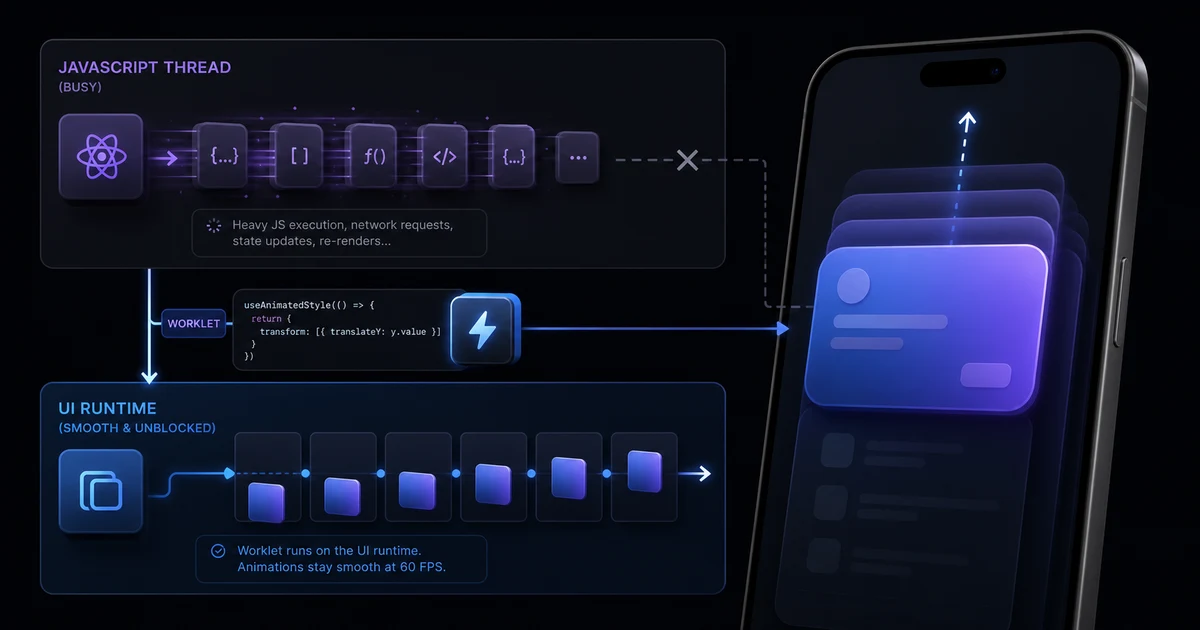
React Native Reanimated in Production
React Native Reanimated is useful when animations, gestures, and interactive UI need to stay smooth while the JavaScript thread is busy. It moves animation work to the UI thread using worklets and shared values, but the UI-thread boundary should still be treated as a measured performance tool rather than a default for every interaction.
Explain Reanimated as a production architecture decision, not just an animation library, from the perspective of a contributor to the library.
My Notes on React Native Reanimated Guide
I wrote this page for people who want a practical view of react native reanimated guide before they make an engineering decision or ask for implementation help.
My preference is to start with the product constraint, then choose the technical approach. A mobile app usually has competing pressures: delivery speed, app size, startup time, offline behavior, platform-specific details, analytics, release risk, and the cost of maintaining the code after the first version ships. Good React Native work keeps those pressures visible instead of hiding them behind library choices.
When I review a codebase or plan a new build, I look for the parts that will create the most operational risk: slow screens, unclear state ownership, fragile navigation, native modules without a release plan, missing test coverage, oversized images, and app-store workflows that depend on manual steps. Fixing those problems early is usually cheaper than trying to recover after users start reporting crashes or performance issues.
That is also why the pages on this site link to each other. Architecture affects performance, testing affects release confidence, Expo choices affect native integration, and component-level decisions can show up later as accessibility, debugging, or maintenance problems. The goal is not to make the app look technically impressive. The goal is to make it stable, understandable, and easy for a real team to keep improving.